


There’s a very specific moment that every advertiser eventually hits.
You open Ads Manager, see the red status, and already know what it is before you click it.
Rejected.
You read the reason. It’s vague. Something like “Misleading content” or “Circumventing systems”. You scroll your ad, check your landing page, and nothing jumps out as obviously wrong.
So you do what most people do the first few times.
You click “Request Review”.
And then you wait.
Sometimes it works. Often it doesn’t. And when it doesn’t, it feels like you’re stuck arguing with a system that isn’t really listening.
That’s where most guides stop — “just appeal it”.
But in practice, appeals are not random. They follow patterns. And once you understand how those patterns work, your approval rate changes pretty dramatically.
This is not a policy breakdown. This is what actually works when you’re trying to get an ad approved after rejection.
Why Most Appeals Fail (Even When You’re “Right”)
The biggest mistake I see is assuming that an appeal is about proving that your ad is compliant.
It isn’t.
An appeal is about convincing the system — and sometimes a reviewer — that your setup does not match a known risk pattern.
That’s a different game entirely.
I’ve had ads that were technically compliant get rejected three times in a row. Same copy. Same offer. No policy violation you could clearly point to.
What changed the outcome wasn’t the argument. It was the structure.
That’s the part most people miss.
If your setup still looks like a high-risk pattern, the appeal usually fails — regardless of how well you explain it.
If you’ve seen rejections that don’t make sense on the surface, it’s usually because of how misleading claim patterns are interpreted across the funnel, not just in the ad itself.
What Actually Happens When You Click “Request Review”
There’s a bit of mythology around appeals, so it’s worth grounding this.
Not every appeal goes to a human.
In many cases, especially for common violations, your ad just goes through another automated pass — slightly more tolerant, but still pattern-based.
This is why you sometimes get an instant “still rejected” response.
No one read your explanation.
It just didn’t pass the second filter.
In other cases, especially if the system is uncertain, it gets escalated to a manual reviewer.
That’s where things become less predictable — but also more recoverable.
I’ve had appeals approved after rewriting nothing but the explanation. And I’ve had others rejected instantly until I changed the landing page.
The key difference is whether the system sees your setup as borderline or clearly risky.
Step 1: Diagnose Before You Appeal
This is where most people rush.
They get rejected, click appeal immediately, and hope for a different outcome.
In practice, that rarely works unless the rejection was a clear mistake.
The better approach is to pause and ask a simple question:
What pattern does this look like?
Not “what policy did I break”.
Pattern.
Is your ad implying an outcome without clearly supporting it?
Is your landing page delaying explanation behind a step?
Is there a mismatch between what the ad suggests and what the page shows?
I’ve had campaigns where nothing looked wrong until I compared the ad and landing side by side, line by line. That’s usually where the gap shows up.
If you skip this step, you’re basically appealing blind.
Step 2: Decide — Fix First or Appeal As Is
This is the fork that actually matters.
You have two options:
Appeal without changing anything
Fix the issue first, then appeal
Most people default to the first.
In my experience, that only works when the rejection is clearly incorrect.
If there’s any ambiguity at all, you’re better off fixing the setup first.
I’ve had ads that got rejected twice, then approved instantly after a small change — without even changing the copy.
Sometimes it’s moving a section higher on the page. Sometimes it’s removing a visual that implies too much.
Once the structure changes, the same ad suddenly “makes sense” to the system.
That’s when appeals start working.
Step 3: Fix the Underlying Signal (Not the Surface)
This is where a lot of time gets wasted.
People rewrite headlines, tweak wording, soften claims.
And sometimes that helps. But often, it doesn’t move the needle.
Because the issue isn’t the sentence.
It’s the signal behind it.
This is where it usually becomes obvious.
The ad might look fine on its own. But once you compare it to the landing page, the inconsistency becomes hard to ignore.
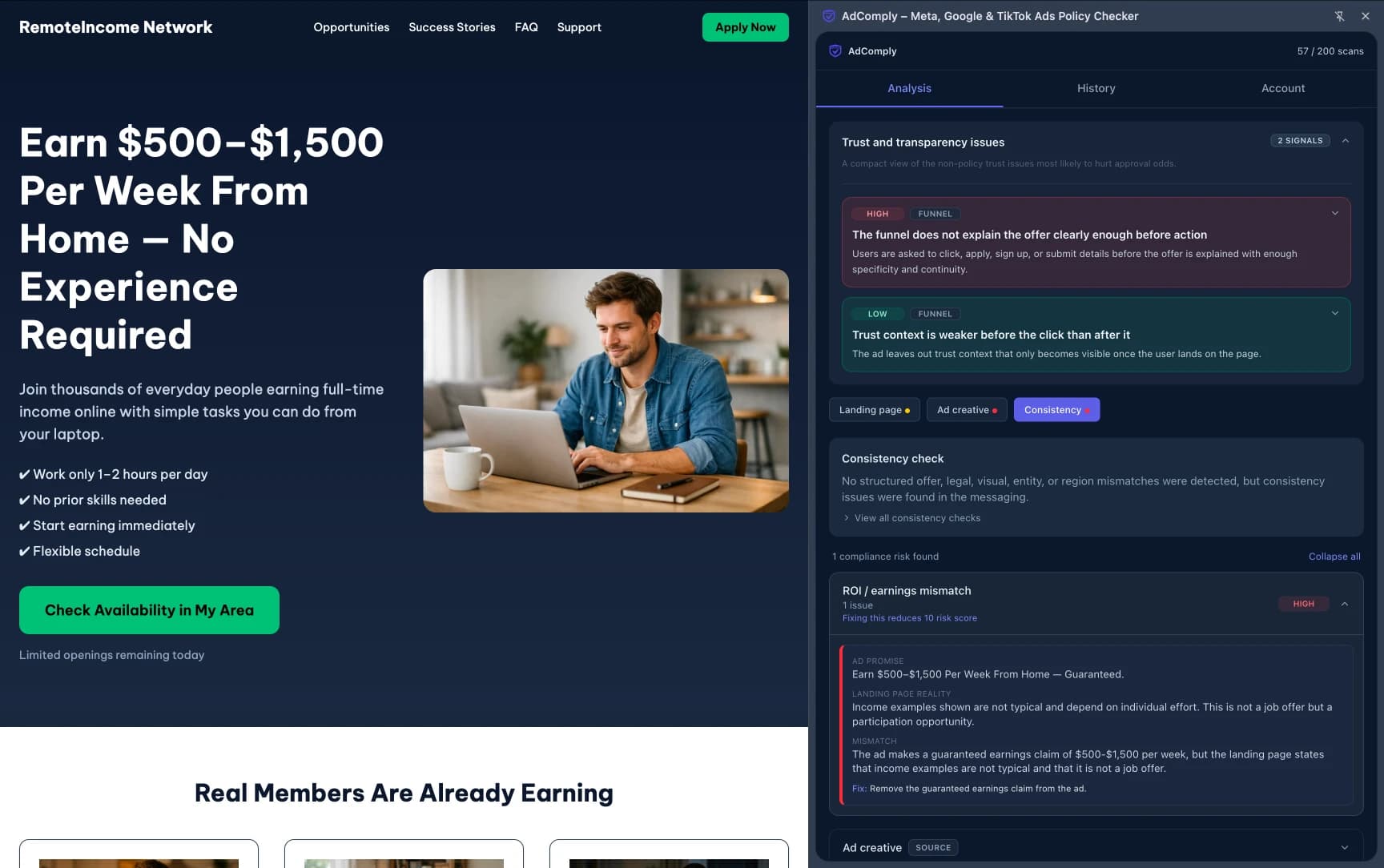
For example:
“Earn $500–$1,500 per week”
That line can pass or fail depending on context.
If your landing page immediately explains variability, effort, and structure, it might pass.
If the explanation comes later, or contradicts the claim, it gets flagged.
I’ve seen ads get approved without changing the headline — just by moving the disclaimer above the fold.
Same words. Different placement.
That’s the level of detail the system reacts to.
If you’ve dealt with cases where ads get rejected instantly, it’s often because these signals stack early in the process, before a full review even happens. I’ve broken that down in more detail here: why some ads get rejected instantly.
Step 4: Write an Appeal That Sounds Like a Human (Not a Template)
This part is underrated.
Most appeal messages sound the same:
“Our ad complies with Meta policies. Please review again.”
That doesn’t help.
If your appeal reaches a human, you have a small window to make your case clear.
Find Rejection Risks Before You Submit
Scan your ad funnel for policy risks, risky claims, landing-page issues, and ad-to-page mismatches before review.
No signup required • instant results • 5 free scans included
What tends to work better:
Be specific about what the ad does
Reference the landing page clearly
Explain the context behind the claim
For example:
“This ad promotes a training program. The landing page clearly explains that results vary and depend on individual effort. We’ve also added this explanation above the fold to ensure clarity before any action is taken.”
That kind of message shows intent and structure.
It’s not about sounding formal. It’s about being concrete.
I’ve tested this enough times to see the pattern. Vague appeals rarely get traction. Specific ones do.
Step 5: Know When to Stop Appealing
This is the part nobody talks about.
Not every ad should be appealed multiple times.
If you’ve appealed twice and nothing changed, you’re probably dealing with a structural issue.
At that point, repeating the same setup and hoping for a different reviewer is just burning time.
I’ve been there. You think “maybe the next review will pass”.
Sometimes it does. But most of the time, it doesn’t.
The better move is to rebuild the setup in a way that doesn’t trigger the same pattern.
New variation. Cleaner structure. Clearer explanation.
Then launch again.
It’s usually faster than fighting the same rejection loop.
Step 6: Watch for Silent Signals After Approval
Getting an ad approved doesn’t mean you’re done.
Before you launch: A quick scan can show the issues that often lead to ad rejection before you send the campaign for review.
Scan your funnel now →This is another thing that catches people off guard.
I’ve had ads approved, run for a few hours, then get rejected again.
Nothing changed on my side.
What changed was the data.
More users, more interactions, more signals processed.
Sometimes that triggers a second evaluation.
That’s why I treat approval as provisional, not final.
If your setup is borderline, it can still get flagged later.
The safer approach is to fix the pattern fully, not just enough to pass once.
Common Appeal Scenarios (What Actually Works)
There are a few patterns I see over and over again where appeals can work — but only if handled correctly.
False positive on wording
If your ad was flagged for something like “misleading content” but your claim is clearly supported, an appeal can work without changes.
But you still need to explain that support clearly.
Landing page clarity issue
This is one of the easiest to fix.
Move key explanations higher. Make the offer obvious immediately. Then appeal.
I’ve seen approval rates jump just from that.
Mismatch between ad and page
This one almost always requires a fix.
If the ad says one thing and the page emphasizes something else, the appeal won’t help until that’s aligned.
Qualification funnel
If your page asks for input before explaining the offer, expect friction.
Reordering that flow is often enough to change the outcome.
What an Effective Appeal Workflow Actually Looks Like
After enough campaigns, this is the flow I default to:
Pause and identify the pattern
Compare ad and landing page side by side
Fix anything that delays clarity or creates mismatch
Only then submit an appeal
If rejected again, rebuild instead of repeating
It’s not complicated. But skipping steps is what usually causes frustration.
The biggest shift is treating appeals as part of the build process, not a last resort.
Once you start doing that, the whole system feels less random.
Because at that point, you’re not just reacting to rejections.
You’re designing in a way that makes them less likely in the first place.
And when you do need to appeal, you’re not guessing anymore.
You already know what the system is probably reacting to.